Recognize
Your Content

Sign your photos, videos, and files to prove they're yours.

CAI Member
Built on C2PA + CAWG
Download on the Mac App Store Verify a file free in your browser →

Free to verify. 10 free signs a month. Verifying and signing run on your Mac.

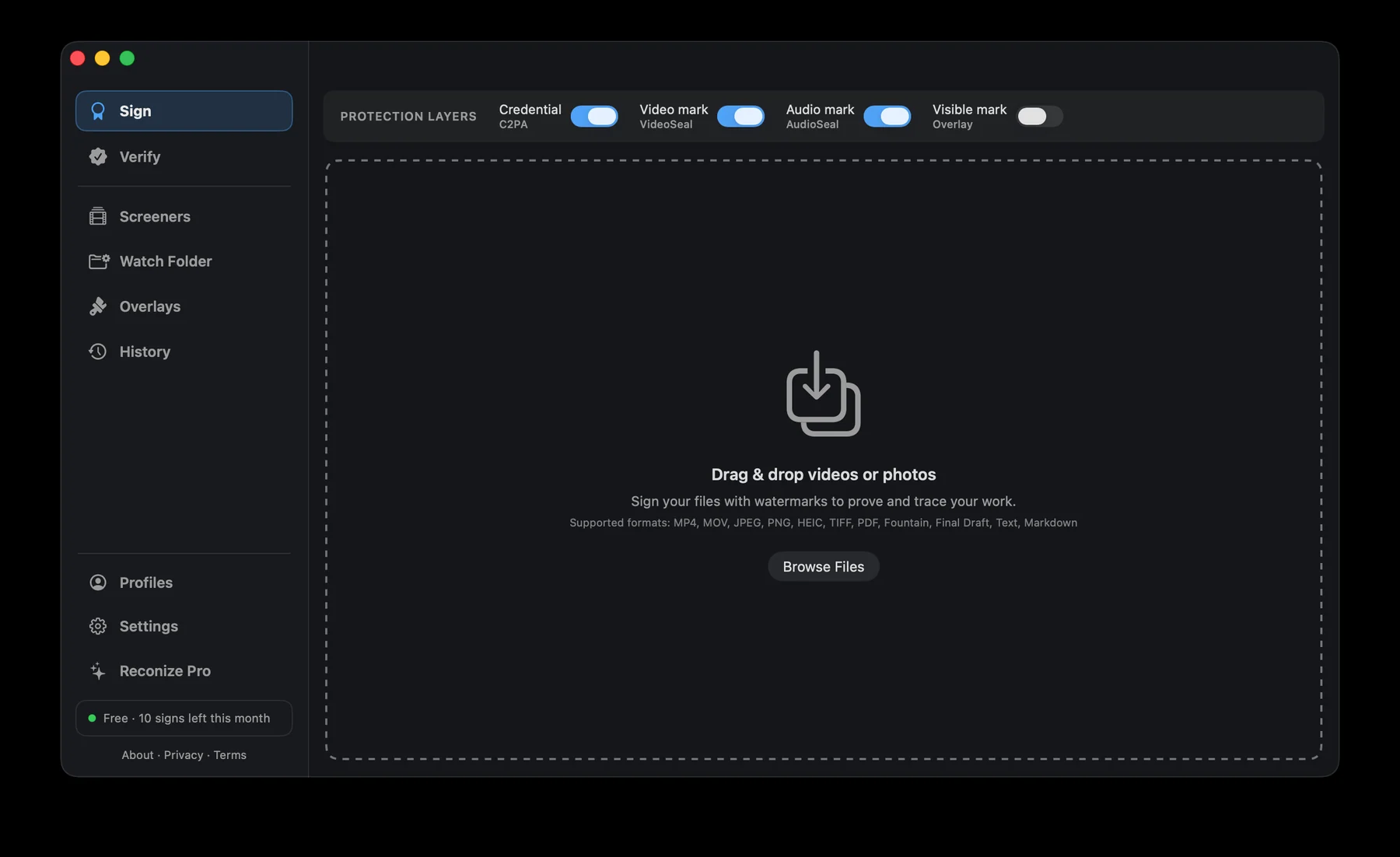
Reconize Sign screen: a batch of files queued to sign, signed as a verified creator, with the credential, video, audio and visible watermark layers
Why it's different

More than
a watermark.

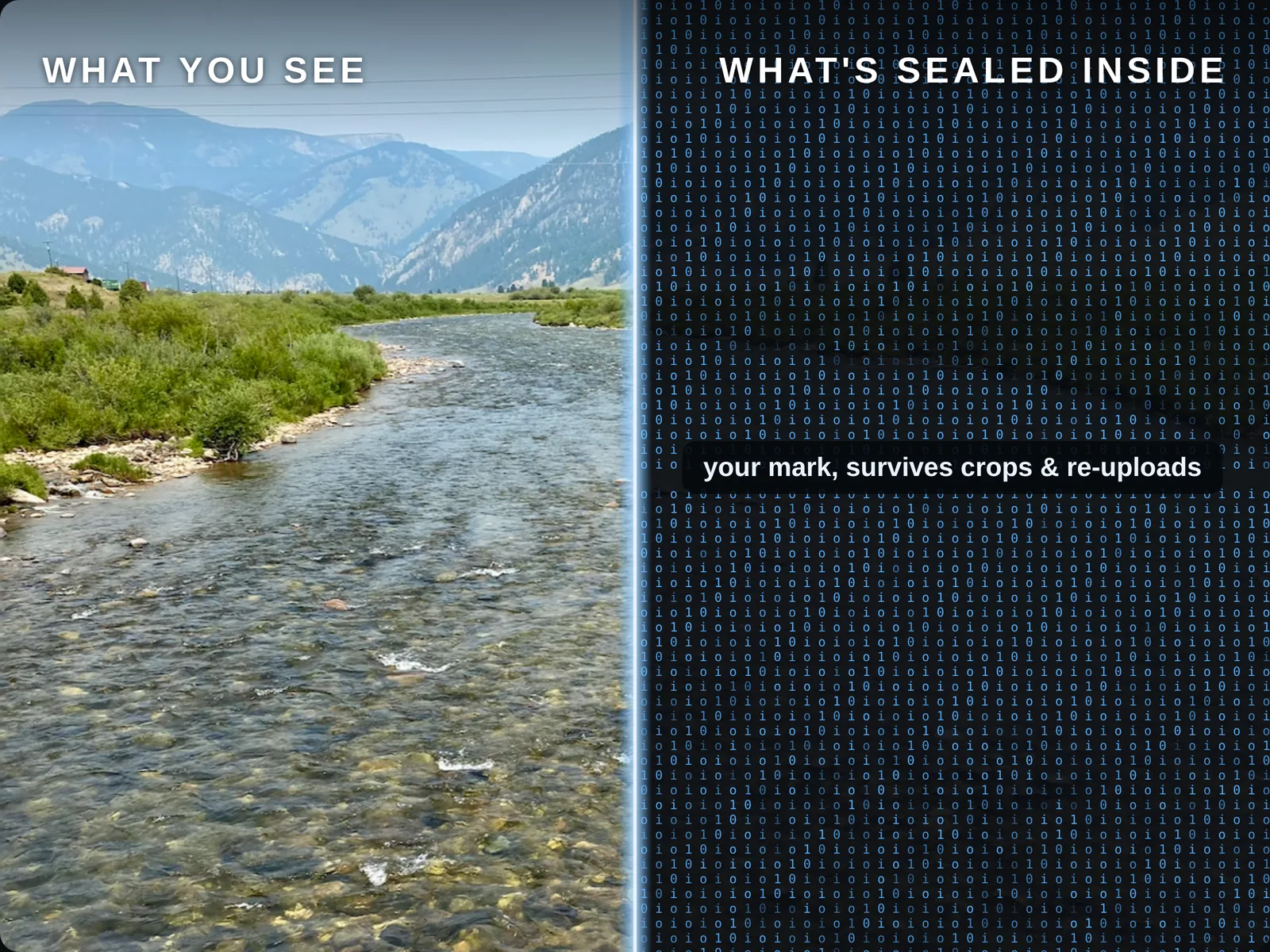
A logo in the corner gets cropped. Metadata can get stripped. Reconize hides your unique digital mark in the file.

A normal watermark

  • Visible logo, cropped off
  • File info, stripped on upload
  • Gone the moment it's shared

A Reconize mark

  • Hidden in the pixels and sound
  • Survives crops, screenshots, re-uploads
  • Still proves it's yours
The same file shown two ways: the photo you see, and the same image rendered as io/10 code with a Reconize mark sealed inside
What it does

Protect your files.

Three kinds of proof, sealed in with one drop.

Proof it's yours

Your verified name — and the channels you’ve connected — are sealed into the file with a tamper-evident credential anyone can check. Your claim is the one with proof behind it.

A mark that travels with it

An invisible ID lives in the pixels and sound, not a corner logo. It survives the edits that erase a normal watermark.

Proof of when

A timestamp seals when you signed — attested by a timestamp authority when one is available — so you can prove your work came first.

New in 1.9

Seal any file.

Not just photos, video and audio. A script, a spreadsheet, an archive, a whole folder — anything that can't carry a credential gets a .reconize receipt beside it, holding the file's fingerprint, a trusted timestamp and your signature. Keep the two together and Verify reads it back as yours.

New in 1.7

Your accounts, in the credential.

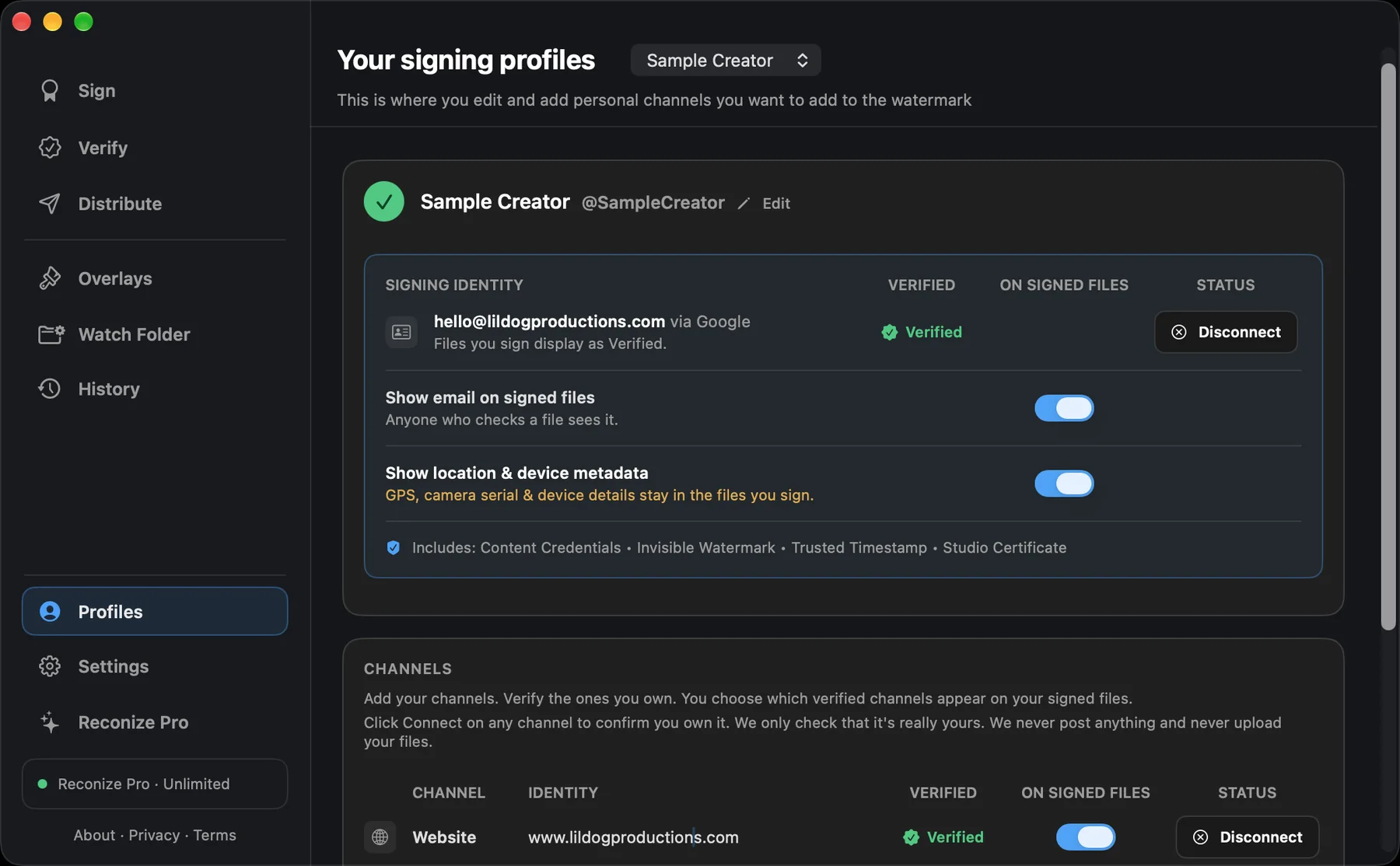
Confirm who you are once, connect the channels you own, and every file you sign carries an identity credential that lists them. Issued by Reconize under the open CAWG standard, checkable in any C2PA reader.

Confirmed, not claimed

Sign in with Apple or Google once, in Profiles. From then on your files carry a confirmed identity credential, bound to your Mac so it cannot be copied onto someone else's work. A free signing certificate is what upgrades them to Verified.

Channels you choose

Connect LinkedIn, YouTube, and Threads, or confirm your website with a DNS record. You pick which verified channels ride along on each signed file.

Checked, honestly

Verify shows exactly which accounts the credential vouches for, and says plainly when it could not check because you were offline. No green badge without a reason.

Get Reconize →
Reconize Profiles screen: a signing identity confirmed with Google and a verified website channel, switched on for signed files
Send

Send it. Trace it.

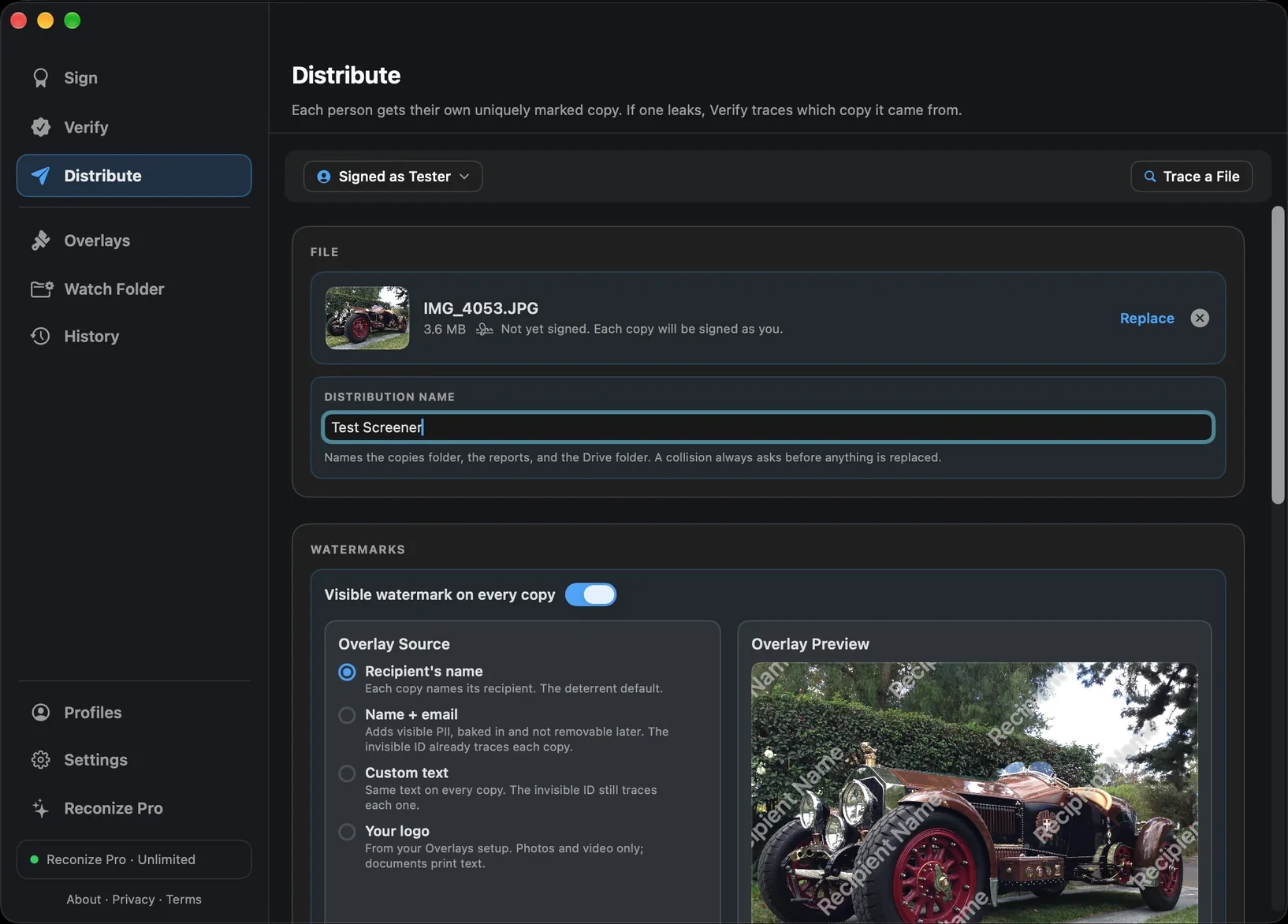
Send gives every person their own invisibly marked copy of your file. If one leaks, Verify tells you which copy it came from.

A copy per person

Each recipient gets a copy carrying its own unique ID, hidden in the pixels and sound. Copies are opaquely named; the map of who got which copy stays private on your Mac.

Marks that outsmart leaks

Tile your name across the whole frame, or let the mark fade in and out on a schedule unique to each copy. No two copies share quiet moments, so screen recordings still tell on themselves.

A leak becomes a lead

Drop a suspect file into Verify and it names the recipient whose copy it was, with custody records and an evidence report you can export. A match points to a copy, not a culprit.

Deliver by Google Drive with per-recipient sharing, or save locally and send your way. Custody records and a delivery guide are written for you, every run.

Get Reconize →
Reconize Send screen: per-recipient watermarked copies with delivery via Google Drive and a locked recipient list
The other half

Check any file.

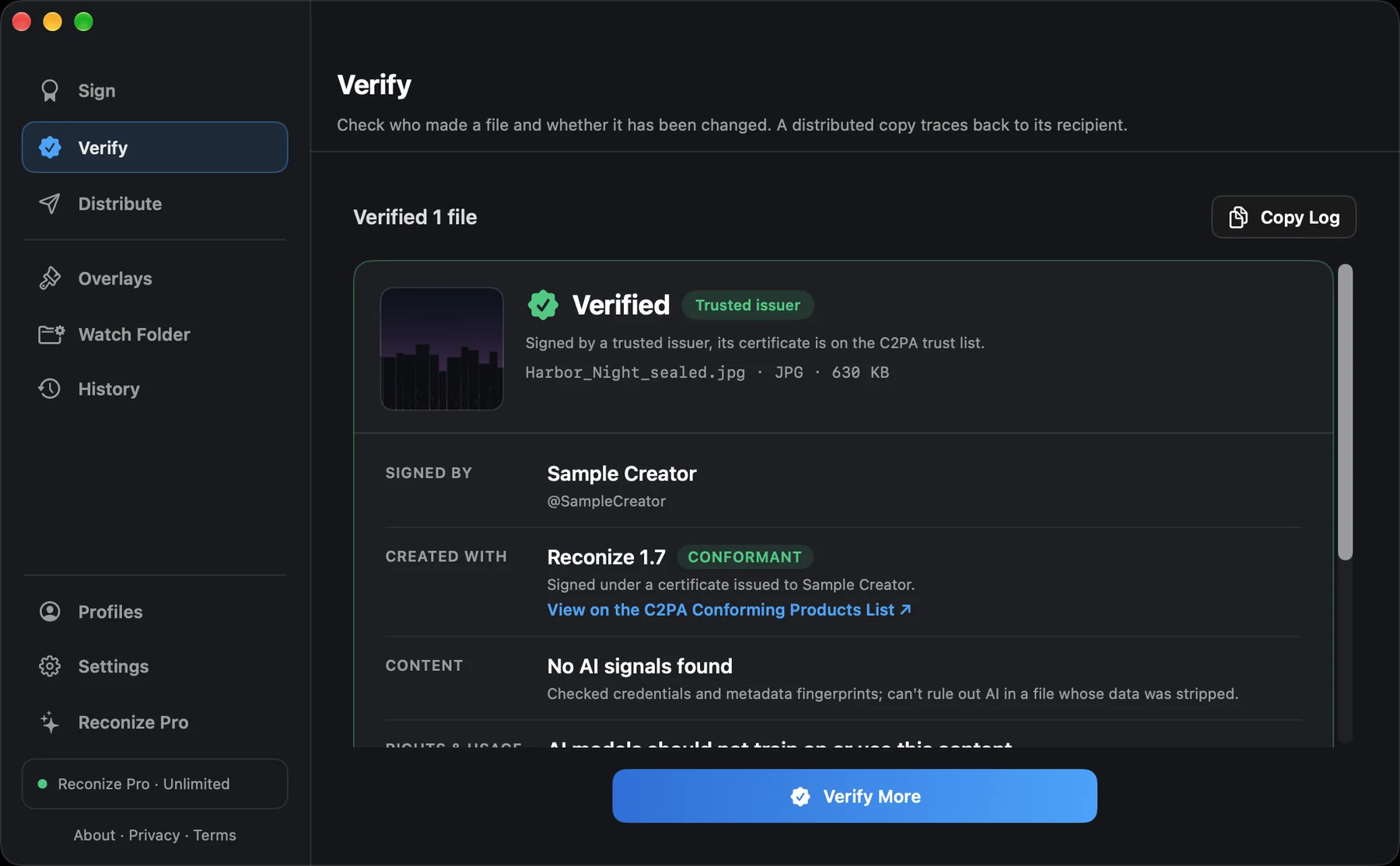
Drop in any file. Reconize shows who made it, the channels they’ve verified, and whether it’s been changed since it was signed — and Verify tells you plainly when the credential behind a signature has been withdrawn, or simply could not be checked, so a revoked identity never reads as a clean one. Free and unlimited, always.

Verify a file free in your browser →
Reconize Verify screen: a signed photo reading Verified, Trusted issuer, signed by Sample Creator with a conformant Reconize 1.7
Who it's for

Made for how you work.

Filmmakers & creators

Seal your name and an invisible mark into every cut and export before it leaves your hands.

Protect your films →

Photographers

Prove a photo is yours, even after it's reposted with your name and info stripped off.

Protect your photos →

Writers

Seal your name and a timestamp into every draft, script, or story before it circulates.

Protect your work →

Musicians

Hide your ID inside the sound itself. Prove you made a track and trace leaks of unreleased music.

Protect your music →

Journalists

Show who filed a photo, clip, or document and when, with provenance a newsroom can stand behind.

Protect your reporting →

Video editors

Sign cuts and exports straight from your timeline, each one sealed with your invisible mark.

Protect your edits →
Private by design

On your Mac.
Not our servers.

Your files and keys never leave your Mac. Verifying and signing are fully on-device. The optional registry listing is the one part that uses our relay, by your choice — it sends your public handle and your file’s invisible mark to trace your work, never the file itself.
You hold the keys. Your signing identity lives in your Mac's Keychain, yours to keep.
Your private info stays private. GPS and device details are removed before sealing, unless you choose to keep them.
Pricing

One price.
One purchase.

Free

$0
  • Verify any file, unlimited
  • 10 signs a month, any format
  • Verified creator identity
  • Unlimited profiles & keys

Reconize Pro

$29.99 Pro unlock
  • Unlimited signing, every format
  • Send: per-recipient tracing
  • Batch signing & watch folders
  • Custody records & delivery tracking

The Reconize app is free to verify and free to try. Unlimited signing is part of Reconize Pro, a one-time purchase.

FAQ

Good questions.

Is it free?

Verifying files is free and unlimited, forever. Signing is free for up to 10 files a month; Reconize Pro unlocks unlimited signing, plus batch and watch folders, for $29.99. Pricing shown at checkout.

Does my file get uploaded anywhere?

Your files and signing keys never leave your Mac — verifying and signing are fully on-device. The one exception is the optional registry: if you turn it on, Reconize sends your public handle and your file’s invisible mark (a short code, never the file itself) to our relay, so your work can be traced back to you after a platform strips its credentials. How the registry works →

Is this a real standard, or something proprietary?

Yes. Reconize writes C2PA Content Credentials, the open provenance standard behind the Content Authenticity Initiative, so the record reads in any C2PA tool. On top of that it seals in an invisible watermark that survives a metadata strip: a pixel mark in photos, and Meta's open-source AudioSeal and VideoSeal in audio and video, so the mark lives in the sound and the frames themselves.

Can the invisible mark be removed?

It lives in the pixels and sound, not a corner logo, so it survives the crops, screenshots, and re-uploads that erase a normal watermark. No mark is truly unremovable, but it's built to survive ordinary sharing.

What kinds of files work?

Photos (JPEG, PNG, HEIC, TIFF), video (MP4, MOV), and audio (WAV, MP3, M4A, AAC, AIFF). It also watermarks scripts and documents (PDF, Final Draft, Fountain, and plain text), which come out as a signed PDF. Drop a file in and Reconize seals the proof in one step.

What is the identity credential, and what is it not?

When you sign with a confirmed identity, Reconize adds a CAWG identity credential to the file listing the channels you connected, each one checked by Reconize at the time you connected it. Any C2PA reader can validate it against Reconize's public key. It says who stood behind the file and which accounts they proved they control. It does not say the file is true, unedited, or owned by that person; the rest of the credential covers edits, and ownership is a matter between people.

Do other people need Reconize to check a file?

Not necessarily. Content Credentials are an open standard, so a signed file can be checked in the free Reconize app or any other C2PA tool, with no upload. It shows who signed it and when, and whether it's been changed since signing.

Do I need a Mac? What about Windows or iPhone?

Verifying is browser-based and works on any device today, including Windows and iPhone, at verify.reconize.me with nothing to install. Signing runs on macOS (Apple silicon or Intel, macOS 14 or later); an iPhone Verify slice is on the near-term roadmap.

Which Macs are supported?

macOS 14 (Sonoma) or later, on both Apple silicon and Intel Macs.
Recognize
your content.

Download on the Mac App Store

Ten seconds to protect it now beats ten weeks trying to prove it later.